

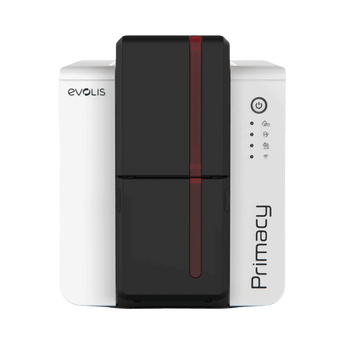


Evolis Primacy 2 ID Card Printer, Single Sided
Couldn't load pickup availability
The Evolis Primacy 2 ID Card Printer is a high performing, single-sided ID printer designed to securely print over 10,000 cards per year. Capable of printing up to 280 high quality colour cards per hour, the Evolis Primacy 2 card printer is able to print regular or rewritable cards as standard.
Also available as a Bundle that includes a 300 print YMCKO ribbon, 100 blank cards and ID-ALL Standard Edition, an enhanced ID card design software from entry-level editions that enables database connectivity.
Printer Specifications
Print Technology:
Direct-to-card printing
Print Speed:
Up to 235 full-colour cards/hour
Up to 280 half-panel colour cards/hour
Up to 1,000 monochrome cards/hour
Print Resolution:
300 dpi, with enhanced resolution options
Card Capacity:
100-card input hopper
100-card output hopper
Connectivity:
USB and Ethernet
Estimated Annual Volume:
Around 10,000 cards per year
Warranty:
3-year manufacturer warranty
Printer Support Packages
For peace of mind after your card printer purchase, we give you 30 days of free email support to help you get up and running.
Or you can choose to upgrade to one of our Aftercare Support Packages to receive expert professional support all year round.
Silver Package - £45 per year
- Email and Telephone Support across printer and software*
- Access to online support library
- 10% off printer consumables (cards, ribbons, cleaning kits)
Gold Package - £145 per year
- Next Day Email and Telephone Support across printer and software*
- Access to online support library
- 15% off printer consumables (cards, ribbons, cleaning kits)
- Remote printer set-up assistance
- Remote access support for troubleshooting
- Zero labour costs if your printer needs repairing
- Loan printer if your printer needs to be returned for a repair.
*Easybadge, CardPresso and ID-ALL software only.
- R5F202E100 YMCKO Colour Ribbon, 200 Prints
- R5F208E100 YMCKO Colour Ribbon, 300 Prints
- R6F207NAAA YMCKOO Colour Ribbon, 250 Prints
- R6F203E100 YMCKOK Colour Ribbon, 200 Prints - Double Sided Printer Only
- RCT219NAAA BlackFLEX Ribbon, 1000 Prints
- RCT223NAAA Black Ribbon, 2000 Prints
- RCT215NAAA White Monochrome Ribbon, 1,000 Prints
- RCT216NAAA Metallic Gold Monochrome Ribbon, 1,000 Prints
- RCT217NAAA Metallic Silver Monochrome Ribbon, 1,000 Prints
Unsure if this is the best ID card printer for you?
Take our Printer Quiz!
Answer four short questions and get recommendations based on your needs.
Alternatively, you can start a chat with us, we're happy to help!
Explore Other Mid & High Volume ID Card Printers
The Evolis Primacy 2 is ideal for organisations printing around 10,000 cards per year with regular, day-to-day issuing.
View mid & high-volume printers →
Not Sure If the Primacy 2 Is Right?
Answer 4 quick questions and we’ll recommend the most suitable printer based on your card volume, speed requirements and print quality needs.
Take the 60-second printer quiz →
Already own an Evolis Primacy 2? Shop compatible printer ribbons, cleaning kits and blank cards in our Evolis Primacy 2 consumables collection.
Why Choose the Evolis Primacy 2 Single-Sided?
The Evolis Primacy 2 Single-Sided ID Card Printer is a high-performance printer designed for organisations producing ID cards regularly throughout the year.
At The Card Network, we recommend the Primacy 2 for organisations printing around 10,000 cards annually. It's particularly suited to schools, healthcare providers, businesses and membership organisations that need reliable, professional card printing.
With speeds of up to 235 full-colour cards per hour, a 100-card input hopper and USB and Ethernet connectivity, it's designed to make everyday card issuing faster and more efficient.
Whether you're printing staff ID cards, student badges or membership cards, the Primacy 2 combines high-quality printing with the reliability and flexibility needed for regular use.
The printer also supports optional upgrades, including automatic double-sided printing, should your organisation's requirements change.
Evolis Primacy 2 Key Printer Features
The Evolis Primacy 2 combines fast ID card printing, flexible resolution settings and optional security upgrades for organisations issuing cards regularly.

Print Quality
Sharp text, clear logos and detailed images, with standard 300 × 300 dpi printing and enhanced modes up to 300 × 600 dpi in colour or 300 × 1200 dpi in monochrome. Enhanced modes are unavailable with Kineclipse.

Fast Print Speeds
The Primacy 2 produces up to 280 colour cards per hour, depending on the ribbon and print settings, and up to 1,000 monochrome cards per hour. Actual throughput varies with your setup.

Rewrite Technology
Built-in rewrite technology lets you erase and reprint compatible rewritable cards, making it useful for temporary badges and visitor passes. This requires specialist rewritable cards; standard PVC cards cannot be erased and reused this way.

Secure Printing
Digital erasing helps protect sensitive data, while optional encoding and security features support organisations requiring controlled access or enhanced card security.
Who Is the Evolis Primacy 2 Single-Sided Best For?
The Evolis Primacy 2 Single-Sided is ideal for organisations printing regularly throughout the year who need speed, reliability and consistent professional results. It’s best suited to teams producing around 10,000 cards per year as part of ongoing operations.
Typical users include:
- Schools and colleges issuing student and staff ID cards
- Corporate offices producing staff badges at scale
- Healthcare providers printing photo ID securely
- Membership organisations handling renewals and replacements
- Multi-site organisations needing dependable batch printing
- Growing teams that have outgrown entry-level printers
With fast print speeds and a robust 100-card feeder, it’s designed for busy admin environments where card issuing is part of everyday workflow — not just an occasional task.
How Many Cards Can the Evolis Primacy 2 Print Per Year?
The Evolis Primacy 2 Single-Sided is designed for organisations printing around 10,000 cards per year, making it a strong choice for teams issuing ID cards regularly throughout the year rather than occasionally. It’s built for frequent, day-to-day use and can comfortably handle new starters, ongoing renewals, replacement cards and steadily growing membership numbers without slowing down. Sitting above entry-level printers but below heavy-duty retransfer systems, the Primacy 2 offers the performance, speed and reliability needed for consistent card issuing in busy environments.
Evolis Primacy 2 Single-Sided vs Double-Sided ID Card Printers
If you’re deciding between the Evolis Primacy 2 single-sided and a double-sided printer, the key difference comes down to how much information you need printed on the back of the card.
Compared to the Primacy 2 Double Sided the single-sided model offers:
- Lower upfront cost for organisations that only print on one side
- Simpler setup and operation where back-of-card printing isn’t required
- The same print quality and speed on the front of the card
- Identical build quality and reliability
- Upgrade path available if double-sided printing is needed later
If your cards only display a photo, name, logo and basic details on the front, the single-sided Primacy 2 is the more cost-effective choice.
However, if you need to print terms, barcodes, signatures, QR codes, or security information on the reverse, the Primacy 2 Duplex saves time by printing both sides automatically.
If you are unsure whether manual double-sided printing is enough, our guide explains whether you can print double-sided cards on a single-sided printer.
| Feature | Evolis Primacy 2 Single-Sided | Evolis Primacy 2 Double-Sided |
|---|---|---|
| Card printing | Prints one side automatically. Turn and reinsert cards manually to print the reverse. | Prints both sides automatically |
| Best for | Photo ID, name badges and logos primarily on one side | Cards with additional information on the reverse, such as barcodes, contact details or terms |
| Print resolution |
Standard: 300 × 300 dpi Enhanced colour and monochrome: 300 × 600 dpi Enhanced monochrome: 300 × 1200 dpi Enhanced modes are not available with Kineclipse. |
Standard: 300 × 300 dpi Enhanced colour and monochrome: 300 × 600 dpi Enhanced monochrome: 300 × 1200 dpi Enhanced modes are not available with Kineclipse. |
| Print speed (colour) | Up to 235 full colour cards per hour | Up to 170 cards per hour (double-sided) |
| Double-sided activation | Optional RFID activation key enables automatic double-sided printing. Purchased separately. | Automatic double-sided printing already enabled |
| Recommended use | Organisations printing primarily single-sided cards, with the option to upgrade later | Organisations regularly printing both sides and wanting to avoid manually turning cards |
| Cost | Lower upfront investment | Higher upfront investment, with time savings when printing both sides regularly |
What's Included with the Evolis Primacy 2?
When ordering the Evolis Primacy 2 single-sided ID card printer, you can choose between a Printer Only option or a GO Pack Bundle, depending on how ready you want to be straight out of the box.
Printer Only:
• Evolis Primacy 2 Single-Sided ID Card Printer
• Reject tray
• ID-ALL Starter ID Card Design Software (up to 50 records)
• Starter cleaning kit
• USB cable
• Power supply & documentation
GO Pack Bundle:
Includes everything in the Printer Only option, plus:
• 300-print YMCKO colour ribbon
• 100 blank PVC cards
• ID-ALL Standard ID Card Design Software
This option gives you everything needed to start printing immediately without sourcing consumables separately.
Optional Add-Ons (Available on Request):
The Evolis Primacy 2 can be configured with additional features if required, including:
• 200-card additional input hopper
• Internal scanner
• LCD colour touch screen
• Magnetic stripe encoding
• Smart card encoding (contact & contactless)
• Kineclipse® masking technology
• Mechanical lock
• Wi-Fi connectivity
If you’re unsure which configuration is right for your organisation, just get in touch. We’ll help you choose the most suitable setup without adding features you don’t need.
Evolis Primacy 2 ID Card Printer Overview
This feature video provides an overview of the Evolis Primacy 2 ID card printer, highlighting its fast print speeds, professional print quality, and suitability for organisations with ongoing card printing requirements. It’s designed for schools, businesses, healthcare providers, and membership organisations that need reliable, high-volume ID card production with consistent results.
Evolis Primacy 2 Specifications
Print Technology:
Direct-to-card dye-sublimation and resin thermal transfer.
ReWrite technology supported.
Print Resolution:
300 × 300 dpi standard, with enhanced resolution options.
Print Speed:
Up to 235 full-colour cards/hour (standard YMCKO)
Up to 280 half-panel colour cards/hour
Up to 1,000 monochrome cards/hour
Card Capacity:
100-card input hopper
100-card output hopper
50-card reject tray
Physical Dimensions (H × W × D):
247 × 205 × 382 mm
Weight:
4.11 kg
Connectivity:
USB and Ethernet
Optional factory-fitted Wi-Fi
Warranty:
3-year Evolis manufacturer warranty
Operating System Compatibility:
Windows and macOS
Estimated Annual Printing Volume:
Around 10,000 cards per year
Evolis Primacy 2 Single-Sided – Frequently Asked Questions
Helpful answers about printing speeds, annual card volumes, software, running costs and choosing the right Primacy 2 printer.
Primacy 2 vs Primacy 1
Understanding the differences and choosing the right printer.
What is the difference between Evolis Primacy 1 and 2?
The Evolis Primacy 2 is the newer generation of the popular Primacy ID card printer, offering enhanced print resolution options, rewritable card printing and additional security and upgrade features.
It is a strong choice for organisations that regularly issue staff ID cards, membership cards and student badges. Optional upgrades include automatic double-sided printing, a 200-card feeder and selected encoding options.
Is the Evolis Primacy 2 good for high-volume printing?
Yes. The Evolis Primacy 2 is a high-performance ID card printer designed for regular, medium- to high-volume card production.
At The Card Network, we recommend it for organisations printing around 10,000 cards per year, although the most suitable printer depends on your printing frequency, batch sizes and card requirements.
If you regularly need information printed on both sides, the Evolis Primacy 2 Double-Sided can save time by printing the front and reverse automatically.
Software & setup
Everything you need to get started and plan for future upgrades.
What software does the Evolis Primacy 2 use?
The Evolis Primacy 2 Printer Only option includes ID-ALL Starter Edition for designing and printing professional ID cards. It supports an internal database of up to 50 records.
Our GO Pack Bundle includes ID-ALL Standard, providing upgraded card design software alongside a colour ribbon and 100 blank PVC cards.
If you need help choosing the right software, read our guide to what ID card software is and why you need it .
Is the Evolis Primacy 2 compatible with Mac?
Yes. The Evolis Primacy 2 has macOS printer support, and ID-ALL card design software is available for Windows and macOS.
Compatibility can depend on your operating system version and any additional functions you need. Contact us before ordering if you use a Mac so we can confirm the most suitable printer and software setup.
Can the Evolis Primacy 2 be upgraded later?
Yes. One of the advantages of the Primacy 2 is its flexibility as your organisation's printing requirements change.
Selected upgrades include automatic double-sided printing via an activation key, a 200-card feeder, an LCD touch screen and a lamination module.
Magnetic stripe and smart card encoding options are also available, depending on the printer configuration.
Some features can be added after purchase, while others must be specified when ordering. Please contact us to confirm compatibility before purchasing an upgrade.
Speed, printing & card types
What to expect from the Primacy 2 in everyday use.
How fast does the Evolis Primacy 2 print?
The Evolis Primacy 2 Single-Sided prints up to 235 full-colour cards per hour using a standard YMCKO ribbon.
With half-panel colour printing, speeds can reach 280 cards per hour. Monochrome printing can reach up to 1,000 cards per hour.
Actual printing speeds depend on your card design, ribbon type and printer settings.
Can I print on both sides with the Primacy 2 single-sided printer?
Yes. With the single-sided Primacy 2, you can print the front of a card, turn it over and manually reinsert it to print information on the reverse.
The printer also supports an optional double-sided activation upgrade using an RFID key, allowing automatic double-sided printing. This upgrade is not included with the single-sided model.
If you regularly print barcodes, expiry dates or other information on the reverse, the Evolis Primacy 2 Double-Sided ID Card Printer may be more suitable.
Read our guide to printing double-sided cards with a single-sided printer .
Is the Evolis Primacy 2 a direct-to-card printer?
Yes. The Primacy 2 uses direct-to-card printing technology, which prints directly onto the surface of a compatible card.
It is suitable for staff ID cards, student badges, visitor passes and membership cards.
Find out more in our guide to direct-to-card vs retransfer ID card printers .
What type of cards can I use with the Evolis Primacy 2?
The Evolis Primacy 2 supports compatible PVC and composite PVC cards, as well as specialist rewritable cards.
PET cards can be printed using the supported black monochrome method, while compatible paper cards require a BlackFLEX ribbon.
The printer can also print onto suitable RFID and smart cards. However, printing a design does not automatically encode the card's chip. Encoding requires an appropriate optional encoder and compatible software.
If you are unsure which cards are suitable, please contact us before ordering.
Ribbons, pricing & running costs
Understanding the initial investment and ongoing printing costs.
What affects the price of the Evolis Primacy 2 ID Card Printer?
The price of the Evolis Primacy 2 depends on the printer configuration and whether you choose the Printer Only option or a GO Pack Bundle.
The GO Pack includes a 300-print YMCKO colour ribbon, 100 blank PVC cards and upgraded ID-ALL Standard card design software, providing the essentials to start printing.
Optional features such as automatic double-sided printing, card encoding and additional capacity can also affect the overall investment.
At The Card Network, we'll help you choose the most suitable configuration for your printing volume and requirements, without recommending unnecessary extras.
What ribbon does the Evolis Primacy 2 use?
The correct ribbon depends on the type of card you want to print.
For full-colour photo ID cards, the Primacy 2 commonly uses a YMCKO colour ribbon. Other compatible options include YMCKOO ribbons for additional overlay protection and monochrome ribbons for single-colour printing.
If you upgrade to automatic double-sided printing, a YMCKO-K ribbon can produce full-colour printing on the front with black printing on the reverse.
Read our guide explaining what ID card printer ribbon letters mean .
How many prints do Evolis Primacy 2 ribbons provide?
Evolis lists the following ribbon capacities:
- YMCKO full-colour ribbon: 300 prints
- YMCKO-K double-sided ribbon: 200 prints
- YMCKOO colour ribbon: 250 prints
- Black monochrome ribbon: up to 2,000 prints
The most suitable ribbon depends on your card design, whether you print in colour or monochrome and whether you need to print on both sides.
How do I work out the running cost per card?
To calculate your approximate consumables cost per card, divide the ribbon price by its print capacity and add the cost of one blank card.
For example, if a 300-print colour ribbon costs £60, the ribbon cost would be 20p per card, before adding the blank card cost. This is an illustrative calculation, not a current ribbon price.
The total cost can also depend on cleaning supplies, optional security features and your printing requirements.
Browse our Evolis Primacy 2 ribbons and consumables or contact us for help estimating the cost of your card printing.
Find Out More

Comparing the Evolis Primacy 2 to the Primacy 1
The Evolis Primacy was one of the best-selling ID Card Printers on the market, so what new features and upgrades can we expect from it's new and improved model, the...
i havent tried the printer yet but it looks decent quality. if i had to say something that i would change it would be that i ordered the original printer early on in the year and i didnt get the replacement until Autumn but i guess its not Card Networks fault they kept hanging on for more info from the supplier

Great product - exactly what we needed.
Thanks for leaving a great product review, very much appreciated!
Best regards
Nikki


