Evolis ID card printers are widely used across the UK to print professional staff ID cards, visitor badges, membership cards and secure access cards.
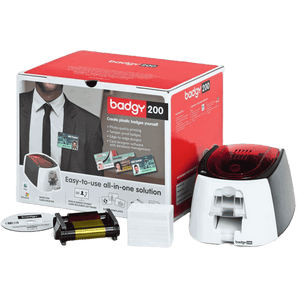
The Evolis range includes entry-level models like the Badgy 200, versatile printers such as the Zenius 2, high-performance options like the Primacy 2, and premium retransfer models such as the Agilia.
Whether you print a few hundred cards a year or run a high-volume card programme, Evolis ID card printers offer reliable performance. The Card Network is anEvolis Approved Platinum Reseller, offering expert UK advice and support across the Evolis printer range.
Not sure which Evolis printer you need? Compare the models below, or jump to our Evolis printer comparison table to see the key differences between Badgy, Zenius, Zenius 2, Primacy 2 and Agilia.
Evolis ID card printers are widely used by schools, businesses, membership organisations and event organisers across the UK. Known for their reliability and ease of use, Evolis printers make it simple to produce professional ID cards, visitor badges and access cards in-house.
The Evolis range includes everything from compact desktop printers for occasional use to high-performance printers designed for busy environments printing thousands of cards each year. Many models also support advanced features such as RFID encoding, magnetic stripe encoding and edge-to-edge printing.
As an Evolis Approved Platinum Reseller, The Card Network provides expert advice, competitive pricing and UK support to help you choose the right printer for your organisation.
Evolis ID Card Printer Comparison
If you’re comparing Evolis models, this table gives you a quick overview of which printer is best suited to different print volumes, card types and feature requirements.
Green = starter pick · Blue = higher throughput / premium output
Hide a printer to simplify the comparison. At least 2 printers will stay visible.
Optional Magstripe, contact and contactless encoding
Advanced smart card encoding
Tip: swipe left/right to compare. Use the Hide buttons to simplify the table. Want a recommendation? Take our Printer Finder Quiz.
Which Evolis ID Card Printer Should You Choose?
If you’re not sure which Evolis printer you need, start with your yearly card volume and whether you need double-sided printing or smart card encoding.
Badgy 200 - best for very occasional printing and small teams (up to 500 cards/year).
ID Card Printers fall into two categories generally - Direct-to-Card or Retransfer. We look at the differences between them, how they print, what they're likely to cost and whether they're...
Answers to the most common questions about selecting the right Evolis model for your card volume, print quality and card type.
Which Evolis printer is best for schools or offices?
For most schools, offices and clubs, the Evolis Zenius 2 is a strong choice for regular day-to-day card printing. If you print more frequently or want more capacity and speed, the Primacy 2 is usually the better long-term option.
What is the difference between Evolis Primacy 2 and Agilia?
The Primacy 2 is a fast direct-to-card printer designed for regular use across schools, businesses and membership organisations. The Agilia is a premium retransfer printer that delivers higher image quality and edge-to-edge results, making it better for high-security or premium card programmes.
Do Evolis printers print double-sided cards?
Some Evolis printers are single-sided as standard, while others are available in double-sided versions. If you need to print terms, branding or extra information on the reverse of a card, look at dual-sided versions of the Primacy 2 or Agilia.
Can Evolis printers print on smart cards or contactless access cards?
Yes, selected Evolis printers support magnetic stripe, contact and contactless encoding for access control and smart card applications. Models such as Primacy 2 and Agilia are better suited to these requirements, especially if you need more advanced encoding or more durable, professional-looking cards.
Cleaning and Maintenance
These are the practical maintenance questions buyers search for most often, especially around cleaning cards, cleaning kits and printhead care.
How do I clean an Evolis Primacy 2 printer?
To clean an Evolis Primacy 2 printer, run the printer’s cleaning cycle using the correct Evolis cleaning card, then clean the rollers and print path as recommended for your model. Regular cleaning helps reduce dust build-up, improves print quality and lowers the risk of jams or print defects over time.
Which Evolis cleaning kit do I need?
The correct Evolis cleaning kit depends on your printer model and how heavily it is used. If you are running a Primacy 2, Zenius or Agilia, it is best to match the cleaning kit to that exact printer model rather than using a generic option. This helps protect the printhead and keeps print quality consistent.
How often should I use an Evolis cleaning card?
You should use an Evolis cleaning card whenever the printer prompts you, when changing ribbons, or sooner if you notice streaks, feed issues or patchy colour. Regular cleaning is one of the easiest ways to extend printhead life and keep your Evolis printer running reliably.
How do I clean an Evolis printer head?
When cleaning an Evolis printer head, always use approved cleaning tools designed for Evolis printers. Avoid household cleaners or anything abrasive. A gentle, model-appropriate printhead clean can help remove debris and improve print quality, especially if you are seeing lines, fading or missing colour panels.
How do I clean an Evolis Zenius or Zenius 2 printer?
Cleaning an Evolis Zenius or Zenius 2 printer usually involves running a cleaning cycle with an Evolis cleaning card and checking the rollers and card path for dust. If print quality issues continue afterwards, the printhead or ribbon path may also need attention.
Cards, Ribbons and Compatibility
Extra answers covering card materials, ribbons and sustainable printing options to strengthen the page for both search and buyer confidence.
Can Evolis printers print on paperboard cards?
Yes, selected Evolis printers including the Zenius 2 and Primacy 2 can print onto Evolis paperboard cards. These are a useful alternative for temporary visitor badges, event passes and more sustainable short-term credentials.
What ribbons do Evolis ID card printers use?
Evolis ID card printers use model-specific ribbons designed for the relevant printer range. Using the correct Evolis printer ribbon helps maintain print quality, reduces ribbon errors and supports reliable day-to-day performance.
Can I use generic ribbons in an Evolis printer?
It is usually best to use genuine Evolis-compatible ribbons for your specific printer model. Using incorrect or poor-quality ribbons can affect print results, lead to ribbon recognition issues and may create unnecessary maintenance problems. Genuine supplies are the safer choice for consistent results.
What cards can Evolis ID card printers print on?
Most Evolis ID card printers are designed for standard plastic cards such as PVC cards, while some models can also support paperboard cards or smart/contactless access cards depending on the printer and configuration. If you need to print onto access control or contactless cards, choose a model with suitable encoding support.
Helpful ID Card Printer Guides
Best ID Card Printers: Expert Buying Guide
Read our reviews of some of the best ID card printers currently on the market.
The wooden cards look great and work well, the design work was completed quickly and very nicely.
Time for production was quite long with to many confirmation emails even following a PO being issued for the product. So deliver took even longer.