


Full colour
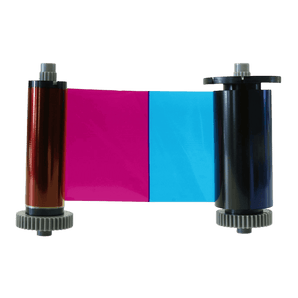
Full-colour YMCKO ribbons
The standard choice for printing full-colour photographs, logos and text on one side of an ID card.
YMCKO =
Yellow, Magenta, Cyan, Black + Overlay
Search by printer model or consumable code. We’ll only show supplies matched to that printer.
Please check your exact printer model before ordering. Single- and double-sided versions can use different ribbons. If you are unsure, ask our printer team and we’ll confirm it for you.
Try the model number from the front or underside of your printer, or enter the code from your existing ribbon.
Ask our printer experts


ID card printer ribbons are designed for specific printer models, so it’s worth checking a few details before you order.
Look for the manufacturer and exact model number on the front, back or underside of your printer.
For example, Magicard 300, Evolis Primacy 2 or IDP Smart 31.
Some printer ranges are available in both single- and double-sided versions, and the compatible ribbon options can differ.
Colour on the front and black on the reverse may require a YMCKOK ribbon.
If you're replacing an existing ribbon, check the manufacturer's product code on the cartridge or packaging.
Compare it with the code shown on our product page to confirm the correct replacement.
Still not sure? Use our Printer Ribbon Finder above, or send us your printer model and we'll help you find the correct ribbon before you order.
The right ribbon depends on what you need to print and the type of ID card printer you're using. Here are the four main ribbon types you're likely to come across.
The standard choice for printing full-colour photographs, logos and text on one side of an ID card.
Used with compatible double-sided printers when you want full colour on the front and black information on the reverse.
A cost-effective choice for printing text, numbers, barcodes and simple graphics where full colour isn't required.
Retransfer printers normally use a colour ribbon together with a separate retransfer film to produce the finished card.
Our quick guide explains the different ribbon panels and what each code means.
Genuine printer ribbons are designed specifically for the printer models they’re intended to fit, helping to deliver reliable print quality, accurate colours and consistent results from one card to the next.
They’re also made to work correctly with your printer’s ribbon detection and print settings, reducing the risk of compatibility problems, failed prints or unnecessary card waste.
For the best results, we recommend using the ribbon specified for your exact printer model rather than choosing a ribbon based on brand alone.
Check the manufacturer and exact model of your printer before ordering. Ribbons are often specific to one printer range or generation, so two printers from the same manufacturer may not use the same ribbon. If you're unsure, send us the printer model and we'll check it for you.
YMCKO refers to the five panels found on many full-colour printer ribbons: Yellow, Magenta, Cyan, Black and Overlay. The colour panels create the printed image, while the overlay helps protect the finished card.
YMCKO is commonly used for full-colour single-sided printing. YMCKOK adds a second black resin panel and is commonly used with compatible double-sided printers to print full colour on the front and black text or details on the reverse.
The expected yield is shown on each ribbon product page. A ribbon rated for 250 prints is designed to produce approximately 250 printed card sides under its specified use. If you print full colour on both sides, you may use two full-colour prints per finished card.
No. Many printer manufacturers use different ribbons across different printer models and generations. Always check the exact compatibility before ordering.
Yes. Retransfer printers normally print the design onto a clear film before transferring it onto the card, so they generally require a compatible colour ribbon plus retransfer film.
Follow the maintenance schedule for your specific printer. Many printers prompt you when cleaning is due, and ribbon changes are a sensible time to check the card path and cleaning roller.
Used ID card printer ribbons can retain an impression of the information printed onto your cards, which may include names, photographs or other personal details. For this reason, used ribbons should be treated as confidential waste and disposed of securely rather than placed directly into general waste.
For more information, read our guide: Why you should always shred your printer ribbon securely after use.
Your cart is currently empty.
Start Shopping


