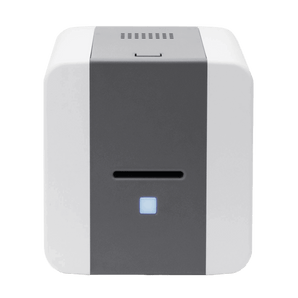
Low volume ID card printers are designed for organisations printing up to around 1,000 cards per year. These entry-level printers are ideal for occasional use and small-batch printing, providing a reliable way to produce professional staff ID cards, visitor passes and membership cards in-house. Each printer in this collection is selected for ease of use, dependable performance and long-term value.
Low-volume ID card printers are ideal for organisations that are printing occasionally, or in small batches. They are commonly used across a range of industries where flexibility, affordability, and ease of use are more important than high-speed batch printing.
Small Businesses
Ideal for employee ID cards and basic access control.
Our low volume ID card printers are designed for entry-level and occasional use. They’re ideal for printing small batches of staff ID cards, visitor passes and membership cards throughout the year rather than running continuous, high-volume production.
Consider how many cards you print These printers are generally suitable for organisations producing up to around 1,000 cards per year. If you expect to print larger batches or your requirements are likely to grow, compare our mid volume ID card printers, which are designed for more regular printing.
Single-sided or double-sided printing A single-sided printer is suitable if most of your information appears on the front of the card. If you only need to print on the reverse occasionally, you can usually turn the card over and feed it through again. An automatic double-sided printer is more convenient when you regularly print information on both sides.
Look beyond the initial purchase price Running costs include printer ribbons, blank cards and cleaning supplies. Comparing the cost per card can help you understand the true long-term cost of each model. Read our guide to ID card printer running costs for a plain-English explanation.
Check connectivity and encoding requirements Some models offer Ethernet connectivity or optional encoding for access-control and smart cards, while others are designed for straightforward photo ID printing. Check that the printer supports the cards and systems you intend to use before ordering.
Not sure which model to choose? Read our ID card printer buying guide, take our printer finder quiz, start a chat or call our team. We’ll help you choose a suitable printer without recommending more machine than you actually need.
Compare low-volume ID card printers
Open the full-screen comparison for an easier view, especially on smaller screens.
Hide printers to create a side-by-side comparison of your short-list. At least 3 printer columns will always stay visible.
Small batch printing and single cards. Good for first-time buyers on a tight budget
Compact office photo ID printing from a reliable, performance-led brand
Compact, faster card printing with built-in visual security features
Small organisations wanting a stronger desktop printer, with single or dual-sided options
Starter card printing and small-batch use with software and consumables included
Users wanting more flexibility for Ethernet and encoding options
Front-desk, reception and customer-facing areas where footprint matters
Print mode
Single-sided
Single-sided
Single-sided
Single-sided or dual-sided 31S available, or 31D if you need duplex from the start
Single-sided
Single-sided
Single-sided
Colour speed
Up to 150 cards/hr
Up to 150 cards/hr
Up to 200 cards/hr
Up to 156 cards/hr (31S) Up to 124 cards/hr (31D)
Up to 95 cards/hr
Up to 180 cards/hr
Up to 150 cards/hr
Input hopper
Hand-fed
50 cards Manual or automatic feeding
50-card feeder
80 cards
25 cards
Automatic or manual
100-card auto-adjusting hopper
Connectivity
USB
USB
USB + Ethernet
USB, optional Ethernet
USB
USB + Ethernet
USB standard, optional Ethernet and Wi-Fi
Encoding options
Magnetic stripe
None on Classic model
None listed Security features include HoloKote and Digital Shredding
Magnetic stripe, contact and contactless
None
Magnetic stripe, contact and contactless
Mag stripe, plus third-party contactless integration kit
Warranty
2 years
2 years
3 years limited
5 years
1 year
3 years
2 years unlimited printer and printhead
Good fit if...
You want the most budget-friendly way to print small batches of cards.
You want a reliable compact printer for standard staff or visitor ID cards
You want speed, compact size and added visual security credentials
You want a more capable desktop printer and may need dual-sided output
You want a simple starter package and are printing very occasionally
You want more flexibility for networking or encoding later
You want a slim, modern desktop printer with strong connectivity options
Tip: use the Hide links inside each printer header to remove models you are not considering. At least 3 printers will remain visible so the comparison still makes sense.
Not sure what all the specs mean?
If terms like encoding, DPI, or dual-sided printing are unfamiliar, our quick guide explains everything in plain English so you can confidently choose the right ID card printer.
Small batch printing and single cards. Good for first-time buyers on a tight budget
Compact office photo ID printing from a reliable, performance-led brand
Compact, faster card printing with built-in visual security features
Small organisations wanting a stronger desktop printer, with single or dual-sided options
Starter card printing and small-batch use with software and consumables included
Users wanting more flexibility for Ethernet and encoding options
Front-desk, reception and customer-facing areas where footprint matters
Print mode
Single-sided
Single-sided
Single-sided
Single-sided or dual-sided 31S available, or 31D if you need duplex from the start
Single-sided
Single-sided
Single-sided
Colour speed
Up to 150 cards/hr
Up to 150 cards/hr
Up to 200 cards/hr
Up to 156 cards/hr (31S) Up to 124 cards/hr (31D)
Up to 95 cards/hr
Up to 180 cards/hr
Up to 150 cards/hr
Input hopper
Hand-fed
50 cards Manual or automatic feeding
50-card feeder
80 cards
25 cards
Automatic or manual
100-card auto-adjusting hopper
Connectivity
USB
USB
USB + Ethernet
USB, optional Ethernet
USB
USB + Ethernet
USB standard, optional Ethernet and Wi-Fi
Encoding options
Magnetic stripe
None on Classic model
None listed Security features include HoloKote and Digital Shredding
Magnetic stripe, contact and contactless
None
Magnetic stripe, contact and contactless
Mag stripe, plus third-party contactless integration kit
Warranty
2 years
2 years
3 years limited
5 years
1 year
3 years
2 years unlimited printer and printhead
Good fit if...
You want the most budget-friendly way to print small batches of cards.
You want a reliable compact printer for standard staff or visitor ID cards
You want speed, compact size and added visual security credentials
You want a more capable desktop printer and may need dual-sided output
You want a simple starter package and are printing very occasionally
You want more flexibility for networking or encoding later
You want a slim, modern desktop printer with strong connectivity options
Not Sure If a Low Volume ID Card Printer Is Right for You?
Low volume ID card printers are designed for small-batch printing or occasional use, typically up to around 1,000 cards per year. If your organisation prints more regularly or produces larger batches, you may benefit from a faster, higher-capacity printer.
A low-volume printer may not be the best fit if:
You print ID cards daily or in large batches
You regularly produce more than 1,000 cards per year
You need faster output for staff onboarding or events
You require advanced encoding, networking or automation features
Choosing the right print-volume category now can help you avoid slow production, bottlenecks and an unnecessary upgrade later. If you’re unsure, use our printer finder quiz for a tailored recommendation.
ID card printer features are the technical specifications that describe how an ID card printer prints, encodes, secures, and connects when producing plastic ID cards. This plain-English guide from The...
Answers to common questions about choosing an entry-level ID card printer for occasional use and small-batch card printing.
Understanding Low Volume ID Card Printers
What low-volume printing means and whether this type of printer suits your requirements.
What is a low volume ID card printer?
A low volume ID card printer is designed for organisations printing cards occasionally or in small batches, typically up to around 1,000 cards per year. It provides professional-quality card printing without the speed, capacity or complexity of a high-volume machine.
How many cards can a low volume ID card printer print per year?
We generally recommend this range for organisations printing up to around 1,000 cards annually. Your typical batch size and how frequently you print are also important. If you regularly produce larger batches, compare our mid volume ID card printers.
Choosing an Entry-Level Printer
Important differences to consider before selecting a printer.
What is the difference between an entry-level and a mid volume ID card printer?
Entry-level printers are designed for occasional use, smaller batches and a lower initial investment. Mid volume printers are better suited to more regular printing and usually offer faster batch production, larger card feeders and additional connectivity or encoding options.
Do I need a single-sided or double-sided ID card printer?
A single-sided printer is suitable when most information appears on the front of the card. You can usually turn the card over and feed it through again when a reverse side is only needed occasionally. An automatic double-sided printer is more convenient if you regularly print information on both sides.
What should I look for in an ID card printer for occasional use?
Consider how easy the printer is to operate, its card-feeding method, ribbon yield, cost per card, connectivity and whether you may need encoding. Our ID card printer buying guide explains these points in more detail.
How do I choose the right low volume ID card printer?
Start with how many cards you expect to print, how often you will print and whether the cards need information on one or both sides. You should also consider your card type, software, connectivity and any encoding requirements. If you are unsure, use our printer finder quiz or speak to our team.
Costs, Features and Setup
Practical information about running costs, print quality and what you need to get started.
What running costs should I consider with a low volume ID card printer?
Running costs include compatible printer ribbons, blank cards and routine cleaning supplies. Compare ribbon prices and print yields to understand the approximate cost per card, particularly if you intend to print in full colour or on both sides.
Can a low volume ID card printer produce professional-quality cards?
Yes. Low volume ID card printers can produce clear, professional cards containing photographs, logos, names, barcodes and other personalised information. The finished result also depends on the card stock, ribbon and artwork used.
Do low volume ID card printers support access control or smart cards?
Some models support magnetic-stripe, contact or contactless encoding, but these features are not available on every printer. If your cards need to work with an access-control, clocking-in or membership system, check the required card technology and encoding options before ordering.
What do I need to start printing ID cards in-house?
You will normally need an ID card printer, a compatible ribbon, blank cards and card-design software. Depending on how the cards will be used, you may also require lanyards, card holders, clips or an encoding option.
See More
Save money when buying an ID Card Printer Bundle
Get everything you need to start printing right away, includes free software.
The wooden cards look great and work well, the design work was completed quickly and very nicely.
Time for production was quite long with to many confirmation emails even following a PO being issued for the product. So deliver took even longer.