

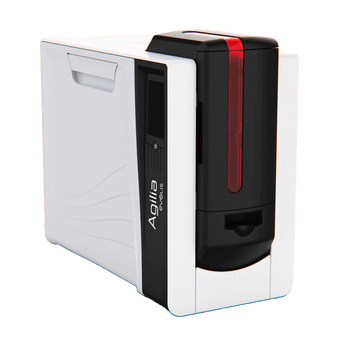


Evolis Agilia Retransfer ID Card Printer, Double Sided
Couldn't load pickup availability
Printer Specifications
Print Technology:
Retransfer
Print Resolution:
600dpi
Print Speed:
150 Full Colour Cards Per Hour (single sided)
Up to 100 Cards Per Hour (double sided(
Card Capacity:
200 Card Input Hopper
100 Card Output Hopper
10 Card Reject Hopper
Warranty:
3-year printer warranty and lifetime printhead warranty. Evolis warranty terms apply.
Operating System Compatibility:
Windows and macOS
Printer Support Packages
For peace of mind after your card printer purchase, we give you 30 days of free email support to help you get up and running.
Or you can choose to upgrade to one of our Aftercare Support Packages to receive expert professional support all year round.
Silver Package - £45 per year
- Email and Telephone Support across printer and software*
- Access to online support library
- 10% off printer consumables (cards, ribbons, cleaning kits)
Gold Package - £145 per year
- Next Day Email and Telephone Support across printer and software*
- Access to online support library
- 15% off printer consumables (cards, ribbons, cleaning kits)
- Remote printer set-up assistance
- Remote access support for troubleshooting
- Zero labour costs if your printer needs repairing
- Loan printer if your printer needs to be returned for a repair.
*Easybadge, CardPresso and ID-ALL software only.
For peace of mind after your card printer purchase, we give you 30 days of free email support to help you get up and running.
Or you can choose to upgrade to one of our Aftercare Support Packages to receive expert professional support all year round.
Silver Package - £45 per year
- Email and Telephone Support across printer and software*
- Access to online support library
- 10% off printer consumables (cards, ribbons, cleaning kits)
Gold Package - £145 per year
- Next Day Email and Telephone Support across printer and software*
- Access to online support library
- 15% off printer consumables (cards, ribbons, cleaning kits)
- Remote printer set-up assistance
- Remote access support for troubleshooting
- Zero labour costs if your printer needs repairing
- Loan printer if your printer needs to be returned for a repair.
*Easybadge, CardPresso and ID-ALL software only.
Unsure if this is the best ID card printer for you?
Take our Printer Quiz!
Answer four short questions and get recommendations based on your needs.
Alternatively, you can start a chat with us, we're happy to help!
Prefer Single-Sided Printing?
The Evolis Agilia Retransfer Single Sided ID Card Printer gives you the same premium retransfer print quality without automatic double-sided printing — ideal if you only ever print one side.
View the Agilia single sided printer →
Not Sure Which ID Card Printer You Need?
Answer 4 quick questions and we’ll recommend the best ID Card printer for your card type, print volume and finish — with guidance, not upselling.
Take the 60-second printer quiz →
Already own an Evolis Agilia? Shop compatible printer ribbons, retransfer film, cleaning kits and blank cards in our Evolis Agilia consumables collection.
Why Choose the Evolis Agilia Double Sided ID Card Printer?
The Evolis Agilia Double Sided Retransfer ID Card Printer is designed for organisations that need premium-quality cards with information printed on both sides. Using advanced retransfer printing technology, it produces true edge-to-edge cards with exceptional colour accuracy and sharp detail.
Automatic double-sided printing (often referred to as duplex printing) means expiry dates, barcodes, terms, or additional security information can be printed on the reverse without manually flipping cards. With 600 dpi print resolution and reliable batch printing, the Agilia is a strong choice for organisations that want consistent, professional ID cards with a high-end finish.
Who Is the Evolis Agilia Double Sided ID Card Printer Best For?
The Evolis Agilia Double Sided Retransfer ID Card Printer is ideal for organisations that need premium-quality cards with information printed on both sides and a consistent, professional finish.
Typical users include:
- Universities and colleges issuing secure student ID cards
- Corporate offices producing high-quality staff ID and access cards
- Membership organisations printing branded cards with terms or barcodes on the reverse
- Government and public sector teams issuing secure identification cards
- Healthcare providers creating durable staff and visitor badges
- Organisations upgrading from a direct-to-card printer to achieve true edge-to-edge printing
Automatic double-sided printing helps speed up card production for teams that regularly include expiry dates, barcodes, access control information, or terms on the reverse of cards, removing the need to manually flip cards during printing.
Key Features - Evolis Agilia Double Sided ID Card Printer
The Evolis Agilia Double Sided Retransfer ID Card Printer combines premium print quality with reliable batch card production. Its retransfer printing technology delivers consistent, edge-to-edge cards, while automatic double-sided printing allows additional information such as barcodes, expiry dates or terms to be printed on the reverse without manually flipping cards.

Design & Ease of Use
- Retransfer printer designed for professional desktop issuance
- 3.5" colour touchscreen for guidance, status and maintenance alerts

Print & Performance
- 600 dpi print head for high-definition cards with sharp detail
- Automatic double-sided printing for faster card production
- Up to 150 colour cards per hour depending on card design and print settings

Security & Durability
- Supports advanced security print elements such as microtext, guilloche patterns and UV printing depending on ribbon type
- Optional lamination module available for enhanced durability and card production

Connectivity & Software
- USB and Ethernet connectivity built in
- Works with Windows PCs using the included starter ID card software
- Mac compatible - please contact us before ordering

Cards & Capacity
- 200-card input hopper and 100-card output hopper for batch printing
- Compatible with PVC, composite PVC, PET, ABS and polycarbonate cards
How Many Cards Can the Evolis Agilia Double Sided Print Per Year?
The Evolis Agilia Double Sided Retransfer ID Card Printer is designed for organisations that print cards regularly throughout the year and need consistent, professional results. While the exact number of cards printed annually will depend on usage patterns and maintenance, the Agilia is typically used in medium-to-high volume environments producing several thousand to tens of thousands of cards per year.
Because the printer uses retransfer printing technology and automatic double-sided printing, it is often chosen where card quality and durability are just as important as output volume. It is well suited to organisations issuing staff ID cards, student ID cards, membership cards, or access control badges on a regular basis.
If your organisation prints fewer than around 1,000 cards per year, a smaller direct-to-card printer may be a more cost-effective option. However, if you require premium card quality, edge-to-edge printing, and reliable batch production, the Evolis Agilia is designed to handle ongoing card issuance with ease.
Evolis Agilia Single Sided vs Double Sided – which one do you need?
Both Evolis Agilia models use the same 600 dpi retransfer printing technology for premium, edge-to-edge card quality. The main difference is whether you need automatic double-sided printing for cards with expiry dates, barcodes, terms or extra security information on the reverse. This quick comparison helps you choose the right Agilia for your workflow.
| Comparison | ||
|---|---|---|
| Best for | Premium retransfer cards printed on one side (or occasional manual flip) | Busy teams producing front + back cards as standard (no manual flipping) |
| Printing sides | Single-sided printing | Automatic double-sided printing |
| Typical card designs | Visitor badges, simple staff ID, membership cards (front only) | Staff ID with terms, expiry dates, barcodes/QR, instructions or signatures on the back |
| Workflow | If you need a back print, you manually reinsert the card | Prints both sides in one go (smoother, faster issuing) |
| Print quality | 600 dpi retransfer (HD finish) | 600 dpi retransfer (HD finish) |
| Edge-to-edge coverage | Retransfer gives excellent edge-to-edge coverage | Retransfer gives excellent edge-to-edge coverage |
| Speed (colour) | Faster per card when printing one side only | Typically slower per card due to printing both sides |
| Upfront cost | Lower cost model | Higher upfront cost (but saves time on double-sided workflows) |
| When to choose it | Choose single-sided if most of your cards are front-only | Choose double-sided if back printing is routine (it quickly pays for itself in time saved) |

On a phone or tablet, swipe sideways to compare printers.
What’s Included with the Evolis Agilia Double Sided ID Card Printer
When you purchase the Evolis Agilia Retransfer Double Sided ID Card Printer, you receive everything required to install and begin setup:
- Evolis Agilia Double Sided
- Retransfer ID Card Printer
- Input Hopper
- Output Hopper
- Reject Tray
- Evolis Premium Suite Drivers
- USB Cable
- Starter Cleaning Kit
- ID-ALL Starter ID Card Design Software (up to 50 records)
Optional Add-Ons
The Evolis Agilia can be configured with additional features depending on your card requirements. Available options include:
- Magnetic Stripe Encoder
- Contact Smart Card Encoder
- Contactless Smart Card Encoder
- Internal USB Hub
- Electromechanical Lock
- Lamination Module (for additional card durability)
If you require encoding capability or additional security features, please contact us before purchase so we can ensure the printer is configured correctly for your application.
Evolis Agilia Key Features and Performance
This feature video provides an overview of the Evolis Agilia Retransfer ID Card Printer, highlighting retransfer print quality, edge-to-edge coverage, and its suitability for organisations producing secure, professional ID cards. It’s designed for teams that need premium card results, consistent performance, and reliable day-to-day card issuance.
Evolis Agilia Specifications
Print Technology:
Retransfer
Print Resolution:
600 × 600 dpi
Print Speed:
Up to 150 full colour cards per hour (single sided)
Up to 100 cards per hour (double sided)
Card Capacity:
200 Card Input Hopper
100 Card Output Hopper
10 Card Reject Hopper
Physical Dimensions:
14.6in x 17.5in x 8.07in
Weight:
21.16lbs (9.6kg)
Connectivity:
USB & Ethernet
Warranty:
3-year printer warranty and lifetime printhead warranty. Evolis warranty terms apply.
Operating System Compatibility:
Windows and macOS
Evolis Agilia Double Sided – Frequently Asked Questions
Quick, practical answers for anyone comparing a retransfer ID card printer to a direct-to-card model, and deciding whether the Evolis Agilia Duplex (double sided) is the right step up.
Retransfer printing & card quality
What you’re really paying for: finish, coverage, and consistency.
What is a retransfer ID card printer?
A retransfer ID card printer prints your design onto a clear film first, then bonds that film to the card surface. This helps deliver a cleaner, more consistent finish than direct-to-card printing, especially when you need sharp detail, strong colour coverage, or you’re printing on less “forgiving” card materials.
Is the Evolis Agilia suitable for detailed card designs?
Yes. Its 600 × 600 dpi resolution produces sharp photos, logos and fine text. Retransfer printing also provides consistent colour coverage for professional ID cards with detailed designs.
Does the Agilia print edge-to-edge?
Yes. The Agilia provides over-the-edge printing, covering the full card surface. This is useful for designs with coloured backgrounds or artwork extending to the edges.
Is Evolis Agilia good for high volume printing?
It’s a great fit for organisations printing regularly who prioritise premium results, but it’s worth knowing that retransfer printing is generally slower and has higher per-card costs than direct-to-card. If you print huge volumes where speed is the top priority, a high-throughput direct-to-card model may be more cost-effective.
Setup, software & consumables
Compatibility, what you need to run it, and what you’ll reorder.
What is the difference between the Agilia single sided and double sided?
The single sided model prints one side of the card. The double sided (Agilia Duplex) prints both sides automatically, which is ideal if you need expiry dates, barcodes, terms, or extra security info on the back. If you print two-sided cards often, duplex saves time and avoids manual flipping.
How fast is Evolis Agilia Duplex printing?
The Agilia prints up to 100 colour cards per hour in double-sided mode, or up to 150 cards per hour in single-sided mode. Actual throughput depends on your card design and print settings.
What software does the Evolis Agilia use, and is it Mac compatible?
Your printer includes ID-ALL Starter Edition for designing and printing cards, with an internal database of up to 50 records. It also uses Evolis Premium Suite 2 for printer drivers, settings and maintenance, with support for Windows and macOS. If you use a Mac, please contact us before ordering so we can confirm the supplied card design software and setup for your workflow.
What consumables does the Evolis Agilia use?
The Agilia needs a compatible colour ribbon and retransfer film, along with suitable blank cards. Cleaning supplies help maintain consistent print quality. Shop ribbons, film, cleaning kits and blank cards in our Evolis Agilia consumables collection.
Can the Evolis Agilia print on RFID cards or alternative card materials?
Yes. The Agilia supports PVC, composite PVC, PET, ABS and polycarbonate cards, including compatible printable RFID and smart cards. Retransfer printing helps provide a consistent finish over areas containing an embedded chip. Our guide explains printing on RFID cards with direct-to-card and retransfer printers. Printing the card surface does not encode its chip. If you already have cards, send us their specification so we can confirm suitability.
Can I add encoding modules (magstripe, smart card or RFID) to the Agilia?
Yes — the Agilia can be configured with encoding options, depending on what you need (magnetic stripe, contact smart, contactless/RFID). These are typically specified at purchase so the printer is supplied with the right hardware. If you’re not sure what your cards require, tell us the system you’re using and we’ll guide you.
Find Out More

ID Card Printers: Direct-to-Card or Retransfer?
ID Card Printers fall into two categories generally - Direct-to-Card or Retransfer. We look at the differences between them, how they print, what they're likely to cost and whether they're...


