

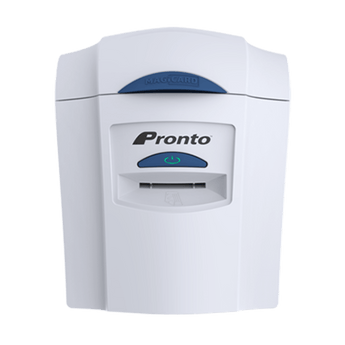


Magicard Pronto ID Card Printer, Single Sided
Couldn't load pickup availability
Printer Specifications
Print Technology:
Dye-sublimation
Print Resolution:
300dpi
Print Speed:
100 Full Colour Cards Per Hour
500 Monochrome Cards Per Hour
Card Capacity:
Manual Input
Warranty:
2 Years
For peace of mind after your card printer purchase, we give you 30 days of free email support to help you get up and running.
Or you can choose to upgrade to one of our Aftercare Support Packages to receive expert professional support all year round.
Silver Package - £45 per year
- Email and Telephone Support across printer and software*
- Access to online support library
- 10% off printer consumables (cards, ribbons, cleaning kits)
Gold Package - £145 per year
- Next Day Email and Telephone Support across printer and software*
- Access to online support library
- 15% off printer consumables (cards, ribbons, cleaning kits)
- Remote printer set-up assistance
- Remote access support for troubleshooting
- Zero labour costs if your printer needs repairing
- Loan printer if your printer needs to be returned for a repair.
*Easybadge, CardPresso and ID-ALL software only.
Unsure if this is the best ID card printer for you?
Take our Printer Quiz!
Answer four short questions and get recommendations based on your needs.
Alternatively, you can start a chat with us, we're happy to help!
Explore Other Low Volume ID Card Printers
The Magicard Pronto sits within our low volume ID card printer range, ideal for organisations printing cards occasionally rather than every day.
View low-volume printers →
Not Sure the Pronto Is the Right Fit?
Answer a few quick questions and we’ll recommend the most suitable printer based on how often you print and what you actually need — no upselling.
Take the 60-second printer quiz →
Why Choose the Magicard Pronto ID Card Printer?
The Magicard Pronto ID card printer is designed for organisations that need to print professional ID cards occasionally, not every day. It’s a simple, compact printer that focuses on reliability and ease of use, making it ideal if card printing isn’t a full-time task in your organisation.
If you only issue cards for new starters, visitors, replacements, or short-term passes, the Pronto keeps things straightforward. Cards are printed individually using a hand-fed system, so there’s no complex setup, large hoppers, or unnecessary features to manage. You print a card when you need one, then get on with your day.
The Pronto is especially popular with small offices, clubs, charities, and organisations upgrading from outsourcing card printing and wanting the convenience of producing IDs in-house without the cost or size of a higher-volume printer. It delivers clear, professional results while staying affordable, compact, and easy to operate.
Magicard Pronto Key Printer Features
The Magicard Pronto is designed for straightforward, low-volume ID card printing where simplicity, reliability, and compact size matter more than speed or automation. It’s ideal for organisations that only need to print cards occasionally but still want professional results.

Clear Print Quality
The Magicard Pronto produces crisp, full-colour ID cards with clear photos and readable text. It’s well suited to staff IDs, visitor passes, and basic membership cards where a clean, professional finish is essential.

Simple, On-Demand Printing
Cards are printed one at a time using a hand-fed system, making the Pronto ideal for organisations that issue IDs as needed rather than in large batches. There’s no hopper to manage and no complex setup just insert a card and print

Compact & Space-Saving
With its small footprint and lightweight design, the Magicard Pronto fits easily on desks, reception counters, or small office workspaces. It’s a practical choice where space is limited and a larger printer would be unnecessary.

Secure by Design
The Pronto includes Digital Shredding™, which fragments card data after printing to help protect personal information. This makes it suitable for organisations handling basic ID data who still want peace of mind around security.
Who Is the Magicard Pronto Best For?
The Magicard Pronto is best suited to organisations that need to print ID cards occasionally, rather than as part of a daily or high-volume process. It’s designed for simple, on-demand printing where ease of use matters more than speed or automation.
It’s a good fit for:
- Small offices and teams issuing staff ID cards infrequently
- Clubs, charities, and community organisations producing basic membership or visitor passes
- Reception desks printing temporary or replacement cards as needed
- Organisations moving away from outsourced printing and wanting a simple in-house solution
- Low-volume users printing up to around 1,000 cards per year
If your card printing is occasional — new starters, visitors, replacements, or short-term passes — the Pronto keeps things straightforward and cost-effective. If you expect to print cards regularly or in batches, a mid-volume printer like the Magicard 300 may be a better long-term choice.
Magicard Pronto vs Magicard Pronto 100: What’s the Difference?
Both the Magicard Pronto and Magicard Pronto 100 are entry-level ID card printers designed for low-volume use, but the way you print your cards is the key difference between them. The Pronto focuses on simple, on-demand printing one card at a time, while the Pronto 100 adds extra convenience for organisations that print cards a little more regularly.
If you only print ID cards occasionally, the Pronto keeps things straightforward and cost-effective. If you expect to print small batches or want less manual handling, the Pronto 100 offers a more automated workflow while staying firmly in the low-volume category.
| Feature | Magicard Pronto | Magicard Pronto100 |
|---|---|---|
| Recommended annual volume | Occasional use (up to ~1,000 cards/year) | Low but more frequent use |
| Card feeding method | Hand-fed, one card at a time | Automatic input hopper |
| Ease of use | Very simple, minimal setup | Still simple, but more automated |
| Print workflow | Best for on-demand printing | Better for small batches |
| Best suited for | Small offices, clubs, reception desks | Organisations printing cards a little more regularly |
| Upgrade path | Entry-level starting point | Step up from the Pronto with added convenience |
How Many Cards Can the Magicard Pronto Print Per Year?
The Magicard Pronto is designed for low-volume ID card printing, typically up to around 1,000 cards per year. It’s best suited to organisations that print cards occasionally, rather than every day or in large batches.
Because the Pronto uses a hand-fed printing process, it’s ideal for issuing cards as and when they’re needed — for example, new starters, visitor passes, replacements, or short-term IDs. You print one card at a time, which keeps things simple but naturally limits how quickly large numbers of cards can be produced.
If your organisation expects to print cards regularly or in batches, a more automated model like the Magicard Pronto100 or a mid-volume printer such as the Magicard 300 may be a better long-term fit. But for occasional, on-demand printing, the Pronto offers a reliable and cost-effective solution.
What’s Included with the Magicard Pronto?
When you order the Magicard Pronto ID card printer, it’s supplied as a simple, entry-level setup designed for low-volume, on-demand card printing.
Magicard Pronto – Printer Only
- Magicard Pronto single-sided ID card printer
- Starter ID card design software (up to 100 records)
- USB cable
- Driver installation and setup support
- 2-year Magicard manufacturer warranty
The Pronto is a hand-fed printer, meaning cards are inserted one at a time. Ribbons and cards are chosen separately depending on how you plan to use the printer.
Consumables Required (Purchased Separately)
- Colour or monochrome printer ribbon
- Blank plastic cards or rewrite cards (for reusable passes)
If you require macOS compatibility, please contact us before purchasing.
How to set up your Magicard Pronto ID Card Printer
This short video walks you through the initial setup of the Magicard Pronto ID card printer, from connecting the printer to your computer to installing the driver and preparing your first card. It’s designed for first-time users and shows just how straightforward the Pronto is to get up and running, even if you’ve never used an ID card printer before.
Magicard Pronto Specifications
Print Technology:
Dye-sublimation
Print Resolution:
300dpi
Print Speed:
100 Full Colour Cards Per Hour, 500 Monochrome Cards Per Hour
Card Capacity:
Manual Input
Physical Dimensions (LxWxH):
10.6in x 8.3in x 9.2in
Weight:
9.7lbs
Connectivity:
USB & Ethernet
Warranty:
2 Years
Magicard Pronto – Frequently Asked Questions
Clear answers to help you decide if the Magicard Pronto is the right low-volume ID card printer for your organisation.
Usage, printing & suitability
For organisations printing ID cards occasionally.
How many cards can the Magicard Pronto print per year?
The Magicard Pronto is designed for low-volume, occasional use. As a guide, it’s typically suitable for organisations printing up to around 1,000 cards per year. If you print more frequently or in batches, a printer with an input hopper may be a better fit.
Is the Magicard Pronto suitable for staff ID cards and photo IDs?
Yes. The Pronto is commonly used for staff ID cards, basic photo IDs, membership cards, and visitor passes. It prints one card at a time using a hand-fed workflow, making it ideal for on-demand printing.
Can the Magicard Pronto print visitor passes using re-write cards?
Yes. The Magicard Pronto supports re-write printing when used with compatible re-write cards. This allows cards to be erased and reused multiple times, making it ideal for visitor passes and temporary IDs.
Does the Magicard Pronto have a card hopper?
No. The Magicard Pronto is a hand-fed printer, meaning each card is inserted individually. This keeps the printer compact and simple but limits batch printing.
Can the Magicard Pronto print double-sided cards?
The Magicard Pronto is a single-sided printer. You can print on both sides by manually flipping the card, but if you need regular double-sided printing, another model may be more suitable.
What’s the difference between the Magicard Pronto and the Pronto 100?
The Pronto is designed for very occasional, on-demand printing using a hand-fed workflow. The Pronto100 adds more convenience for low-volume batch printing with an automated feed, making it better for slightly higher usage.
Setup, compatibility & consumables
Cards, ribbons, speed and day-to-day care.
How long does it take to print a card on the Magicard Pronto?
A full-colour card typically takes around 35 seconds to print. For higher-speed or batch printing, a higher-volume printer would be more efficient.
What type of cards can I print with the Magicard Pronto?
The Pronto prints on standard CR80 plastic cards (credit-card size). You can use blank PVC cards for normal ID cards or re-write cards for temporary passes.
What ribbons does the Magicard Pronto use?
The Magicard Pronto uses Pronto-compatible ribbons, depending on whether you’re printing colour photo IDs, black text-only cards, or re-write visitor passes.
- Magicard MA600KO Black Ribbon (600 prints) – ideal for text-only cards and re-write printing
- Magicard MA100YMCKO Colour Ribbon (100 prints) – suitable for very low-volume colour photo IDs
- Magicard MA250YMCKOK Colour Ribbon (250 prints) – good for small colour batches with added black resin
- Magicard MA300YMCKO Colour Ribbon (300 prints) – a cost-effective option for regular colour printing
If you’re unsure which ribbon is right for your setup, tell us what you’re printing and how often — we’ll guide you to the right option.
Is the Magicard Pronto compatible with Mac?
The Magicard Pronto is primarily designed for Windows systems. If you’re using a Mac, please contact us before ordering so we can advise on compatibility and setup.
What warranty comes with the Magicard Pronto?
The Magicard Pronto comes with a 2-year manufacturer warranty (terms apply).
Do I need special cleaning or maintenance for the Magicard Pronto?
Simple routine cleaning helps maintain print quality and reliability. Using the correct cards and keeping the printer clean reduces dust-related marks and extends printhead life.
Find Out More

ID Card Printer Buying Guide: 8 Things to Check Before You Buy
Printing your own plastic cards for the first time? There are many different ID Card Printer models on the market to consider, with different features and vastly varying price tags....


