
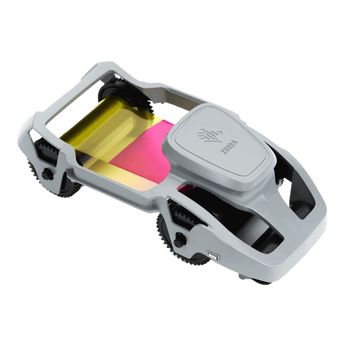


Zebra 800300-250EM YMCKO Colour Ribbon, 200 Prints
Couldn't load pickup availability
See all shipping options →
Printer Compatibility
Zebra YMCKO Colour Ribbon.
Zebra YMCKO Full Colour Printer Ribbon, designed for use with the Zebra ZC100 and ZC300 ID Card Printers.
Capable of 200 prints per-roll, the Zebra YMCKO Ribbon features four high quality colour panels that produce stunning ID cards, membership cards, visitor passes and more.
The Zebra 800300-250EM also contains a transparent overlay panel, designed to add a protective layer to printed cards, protecting cards from everyday wear and tear.
For best results, use this ribbon with high quality blank plastic cards and keep your printer maintained with the correct ID card printer cleaning kit
Zebra 800300-250EM works with:
- Zebra YMCKO Colour Printer Ribbon
Zebra 800300-250EM Ribbon FAQs
Get answers to common questions about ID Card Printer Ribbons.
Which printers is the Zebra 800300-250EM ribbon compatible with?
The Zebra 800300-250EM ribbon is designed for use with the Zebra ZC100 and Zebra ZC300 ID Card Printers. Always check your printer model before ordering, as Zebra ribbons are made for specific printer ranges.
How many cards will the Zebra 800300-250EM ribbon print?
The Zebra 800300-250EM ribbon prints up to 200 full colour card sides per roll. If you are printing one side of each card, this can produce up to 200 cards. If you are printing full colour on both sides, each card will use two printed sides.
What else do I need with this Zebra ribbon?
To print cards with the Zebra 800300-250EM ribbon, you will also need compatible blank plastic cards. We also recommend using the correct ID card printer cleaning kit to help maintain print quality.
What does YMCKO mean?
Card Printer Ribbons are made up of panels of colour and each panel is represented by a letter. These mean:
Y = Yellow
M = Magenta
C = Cyan
K = Black
O = Clear protective overlay that adds a thin layer of protection onto your cards.
Plastic card printers mix all of the YMC and K panels together to create all colours in the spectrum.
Most printer ribbons are YMCKO as this suits most people’s printing needs.
Does the overlay protect the printed card?
Yes, the clear overlay panel adds a protective layer over the printed card. This helps protect the print from everyday handling and general wear and tear.
I’m printing in black only, do I need a YMCKO ribbon?
No. If you’re only printing in black onto your cards (for example text only or barcode) it is far cheaper to print using a black-only ribbon.
This has one panel and represents considerable cost savings when compared to a full colour ribbon.
When should I choose a YMCKOK ribbon over a YMCKO?
If you have a double-sided printer and are printing full colour on the front of your cards and black-only on the reverse, it is much cheaper to do so using a YMCKOK ribbon.
The extra ‘K’ on the end of the code stands for an extra black panel that prints on the reverse of the card at the same time as full colour prints onto the front.
Will a YMCKOK ribbon work on a single sided card printer?
No, it will only work in a double-sided card printer.
The extra ‘K’ on the end of the code stands for an extra black panel that prints on the reverse of the card at the same time as full colour prints onto the front.
Should I clean my card printer when I change the ribbon?
ID Card Printer manufacturers recommend you run a cleaning cycle every time you change the ribbon in order to keep the printer running smoothly, and then do a deep clean once in a while.
Most ribbons come with a cleaning roller in the box.
Why should I shred my printer ribbon after use?
If you’re using a Direct to Card printer (which the majority of printers on the market are), the ribbon retains an imprint of the data on the card after printing.
So, if you’re printing an ID card with a photograph for example, all of this data will be left behind on the ribbon afterwards. That’s why it’s really important to shred your printer ribbon securely when you replace it with a new one for data protection.
Will any of these ribbons work with my printer?
No. It’s really important you check the compatibility of each printer ribbon to check it will work with your specific model.
Don’t assume that a Magicard ribbon will work in all Magicard printers for example, it will be designed to work in a specific printer model only.


