

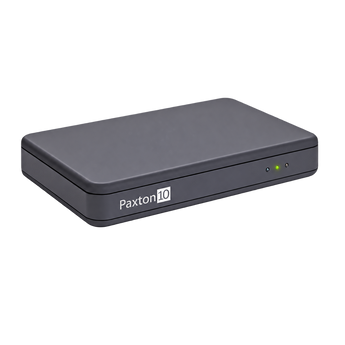


Paxton10 010-392 Universal Desktop Reader, USB
The Paxton10 010-392 Universal Desktop Reader makes it easy to add cards, fobs and tokens to your Paxton10 access control system. Featuring a simple USB connection and slimline desktop design, it supports multiple token technologies, including MIFARE® and Paxton10 encrypted cards and keyfobs. Replaces the previous 010-387 model.
Specifications
Connection:
USB
Token Compatibility:
Paxton encrypted, Paxton standard, EM4100/02, MIFARE®, HID Prox, FeliCa, NFC and DESFire
Paxton10 010-392 Universal Desktop Reader, USB
The Paxton10 Universal Desktop Reader is designed for registering cards, fobs and tokens on Paxton10 access control systems. Replacing the 010-387 model, it supports all Paxton10 tokens, including encrypted cards and keyfobs.
Setup is straightforward: connect the reader to a free USB port on your computer using the supplied cable, then log in to your Paxton10 software through a web browser. No additional token-format configuration is required.
Present a new card or fob to open a new user record, ready to add their details and assign access permissions. If the token is already registered, the reader brings up the existing user’s record.
Its slimline design sits neatly beside your computer, while multi-format technology supports Paxton, MIFARE®, HID™ Prox, EM, FeliCa, NFC and DESFire tokens.
Cable Type:
Mini USB to USB (cable supplied)
Proximity:
Yes
Magstripe:
No
Software:
Paxton10
Token Compatibility:
Paxton encrypted, Paxton standard, EM4100/02, MIFARE®, HID Prox, FeliCa, NFC and DESFire
Dimensions:
115.2 × 76.3 × 18.4 mm
Operating Voltage:
5 V (USB)
Power Consumption:
0.5W
Operating Temperature:
0°C to +49°C
Warranty:
Paxton 5-year warranty
- Paxton10 010-392 Desktop Reader
- Mini USB to USB cable
Paxton10 Universal Desktop Reader FAQs
Get answers to common questions about the Paxton10 Desktop Reader.
Does the 010-392 replace the Paxton10 010-387 Desktop Reader?
Yes. The Paxton10 010-392 Universal Desktop Reader replaces the previous 010-387 model and adds support for Paxton10 encrypted cards and keyfobs.
What does the Paxton10 Universal Desktop Reader do?
It allows you to register cards, fobs and tokens on your Paxton10 access control system. You can also scan an existing token to bring up its associated user record.
Which cards and fobs can it read?
The reader supports all Paxton10 tokens, including Paxton10 encrypted cards and keyfobs. It also reads Paxton, MIFARE®, HID Prox, EM, FeliCa, NFC and DESFire token technologies.
How do I connect the reader?
Connect it to a free USB port on your computer using the supplied 1.8-metre Mini USB to USB cable, then log in to your Paxton10 software through a web browser. No additional token-format configuration is required.
How do I add a new card or fob?
With your Paxton10 software open, present the new card or fob to the reader. A new user record will open so you can enter the user’s details and assign their access permissions.
What happens if I scan a card that is already registered?
The existing user’s record will appear in the Paxton10 software, allowing you to view their details and manage their access permissions.


