

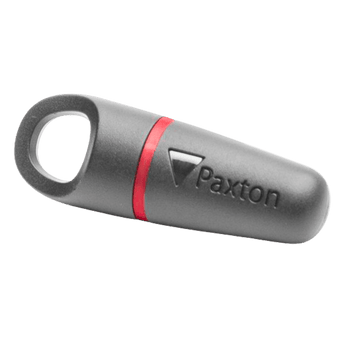


Paxton Switch2 Fobs, Red
Couldn't load pickup availability
Paxton Switch2 Fobs with a red band. For use with Compact and Switch2 access control systems. Available as a pack of 10 (820-010R) or pack of 50 (820-050R), supplied in wallets with a corresponding shadow card for ease of management. A lost key fob can be voided with the shadow card.
Compatibility
- Paxton Compact Access Control Systems
- Paxton Switch2 Access Control Systems
Downloads
Paxton Red Switch2 Proximity Keyfobs.
Paxton Red Keyfobs are an access control fob, designed for use with the Paxton Compact and Switch2 systems.
Available as a pack of 10 or 50, the Paxton Proximity Fobs come with a matching shadow card, to create a secure and efficient process of issuing tokens.
The Paxton Red Keyfobs are easy to enrol, whilst the shadow card keeps the information of the token user to ensure fobs are easily matched to their holder.
Product code: 820-010R for a 10 pack and 820-050R for a 50 pack.
Not sure if this is the right fob for your system? Read our Practical Guide or start a Chat with us.
Paxton Red Keyfobs are compatible with:
- Paxton Compact Access Control Systems
- Paxton Switch2 Access Control Systems
- 10 or 50 pack of Paxton Red Keyfobs and Shadow Cards
Paxton Switch2 Fobs FAQs
Answers to common questions about the Paxton Switch2 range of fobs and cards.
Will these red fobs work on my Net2 access system?
No. If you have a Net2 system, you will need the fobs with a blue band, product code 695-644.
Do I need a PC to enrol my Switch2 fobs?
No. Paxton Switch2 is a simple, flexible standalone access control system that doesn't need a PC. You enrol using the access reader itself.
I need the fobs that come with an associated card - what should I buy?
You need the Switch2 820-xxx range. These packs have keyfobs in a choice of green, red or amber - and are paired with the associated shadow card. The exact product code depends on the size of pack you colour you need (10 or 50), so a 10-pack of green fobs would be 820-010G.
I currently use fobs with a green band, which products do I need?
You need Switch2 fobs that begin with the code 820. The exact product code depends on the quantity you require. You can buy packs of 10 and 50 - so if you need 20 fobs, you’ll need to buy two packs of the 820-010G.
What’s the difference between the green, red and amber Switch2 fobs?
In terms of technology, there is no difference at all between the green, red and amber fobs.
Companies use the different colours to provide a visual means of demarcating access to different areas of the building.
For example, green fobs may be given to users who only have access to Area A, whereas amber fobs could be given to users who have access to Areas A & B. Red fobs could be given to users who have access to Areas A and C, and so on.
In other words, you can use the colour coded fob system to control different user rights.
If we currently use the green banded fobs, can we use the amber and red as well?
Yes. There is no difference in terms of the technology between the fobs - they are usually used as a means of managing different user access rights through a colour-coded system.


