
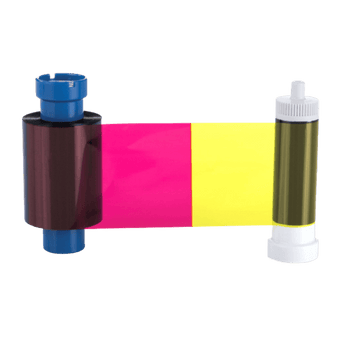


Magicard MA300YMCKO Colour Ribbon, 300 Prints
Couldn't load pickup availability
See all shipping options →
Magicard YMCKO Colour Ribbon, designed for use with the Magicard Pronto, Enduro and Rio Pro ID Card Printers. Capable of 300 prints per roll, the Magicard MA300YMCKO features four high quality colour panels, with a transparent overlay that adds a layer of protection and durability to printed plastic cards.
Printer Compatibility
- Magicard Enduro3e ID Card Printer
- Magicard Pronto ID Card Printer
- Magicard Rio Pro 360 ID Card Printer
- Magicard Rio Pro ID Card Printer
- Magicard Rio Pro Secure ID Card Printer
- Magicard Rio Pro Xtended ID Card Printer
Magicard YMCKO Colour Ribbon.
Magicard YMCKO Full Colour Printer Ribbon, designed for use with a range of Magicard ID Card Printers including the Magicard Pronto, Enduro and Rio Pro Printers.
Capable of 300 prints per-roll, the Magicard YMCKO Ribbon features four high quality colour panels that produce stunning ID cards, membership cards, visitor passes and more.
The Magicard MA300YMCKO also contains a transparent overlay panel, designed to add a protective layer to printed cards, protecting cards from everyday wear and tear.
Please note: this ribbon is NOT compatible with the Magicard Pronto100, 300 or 600 printer models.
For best results, use this ribbon with high quality blank plastic cards and keep your printer maintained with the correct ID card printer cleaning kit.
Magicard MA300YMCKO works with:
- Magicard Enduro3e ID Card Printer
- Magicard Pronto ID Card Printer
- Magicard Rio Pro 360 ID Card Printer
- Magicard Rio Pro ID Card Printer
- Magicard Rio Pro Secure ID Card Printer
- Magicard Rio Pro Xtended ID Card Printer
- Magicard YMCKO Colour Printer Ribbon
Magicard MA300YMCKO Ribbon FAQs
Get answers to common questions about ID Card Printer Ribbons.
Which printers is the Magicard MA300YMCKO ribbon compatible with?
The Magicard MA300YMCKO ribbon is compatible with selected Magicard printers, including the Magicard Pronto, Magicard Enduro3e, Magicard Rio Pro, Magicard Rio Pro 360, Magicard Rio Pro Secure and Magicard Rio Pro Xtended. Always check your printer model before ordering.
Is this ribbon compatible with the Magicard Pronto100, 300 or 600?
No. The Magicard MA300YMCKO ribbon is not compatible with the Magicard Pronto100, Magicard 300 or Magicard 600 printer models. If you have one of these printers, you will need a different ribbon.
How many cards will the Magicard MA300YMCKO ribbon print?
The Magicard MA300YMCKO ribbon prints up to 300 full colour cards per roll. The final number of prints can vary slightly depending on your printer settings and card design.
What does YMCKO mean?
Card Printer Ribbons are made up of panels of colour and each panel is represented by a letter. These mean:
Y = Yellow
M = Magenta
C = Cyan
K = Black
O = Clear protective overlay that adds a thin layer of protection onto your cards.
Plastic card printers mix all of the YMC and K panels together to create all colours in the spectrum.
Most printer ribbons are YMCKO as this suits most people’s printing needs.
Do I need a YMCKO ribbon if I only print in black?
No. If you’re only printing in black onto your cards (for example text only or barcode) it is far cheaper to print using a black-only ribbon.
This has one panel and represents considerable cost savings when compared to a full colour ribbon.
When should I choose a YMCKOK ribbon over a YMCKO?
If you have a double-sided printer and are printing full colour on the front of your cards and black-only on the reverse, it is much cheaper to do so using a YMCKOK ribbon.
The extra ‘K’ on the end of the code stands for an extra black panel that prints on the reverse of the card at the same time as full colour prints onto the front.
Will a YMCKOK ribbon work on a single sided card printer?
No, it will only work in a double-sided card printer.
The extra ‘K’ on the end of the code stands for an extra black panel that prints on the reverse of the card at the same time as full colour prints onto the front.
Should I clean my Magicard printer when I change the ribbon?
ID Card Printer manufacturers recommend you run a cleaning cycle every time you change the ribbon in order to keep the printer running smoothly, and then do a deep clean once in a while.
Most ribbons come with a cleaning roller in the box.
Should I securely dispose of used printer ribbons?
If you’re using a Direct to Card printer (which the majority of printers on the market are), the ribbon retains an imprint of the data on the card after printing.
So, if you’re printing an ID card with a photograph for example, all of this data will be left behind on the ribbon afterwards. That’s why it’s really important to shred your printer ribbon securely when you replace it with a new one for data protection.
Will any of these ribbons work with my printer?
No. It’s really important you check the compatibility of each printer ribbon to check it will work with your specific model.
Don’t assume that a Magicard ribbon will work in all Magicard printers for example, it will be designed to work in a specific printer model only.


